Hinge Prediction using Alpha Shape
This tutorial familiarises users with the both Command-line Interface (CLI) and Graphical User Interface (GUI) of the Hinge Prediction algorithm using Alpha Shapes. The same functionality is also available in the PACKMAN API ( Hinge Prediction using Alpha Shape (API) ).
Please note that there are webservers available for majority of publications in this package before running either User Interface (UI). Example:
PACKMAN Hinge Prediction Web Server: https://packman.bb.iastate.edu/
How to cite:
Pranav M. Khade, Ambuj Kumar, Robert L. Jernigan, Characterizing and Predicting Protein Hinges for
Mechanistic Insight, Journal of Molecular Biology, Volume 432, Issue 2, 2020, Pages 508-522,
ISSN 0022-2836, https://doi.org/10.1016/j.jmb.2019.11.018.
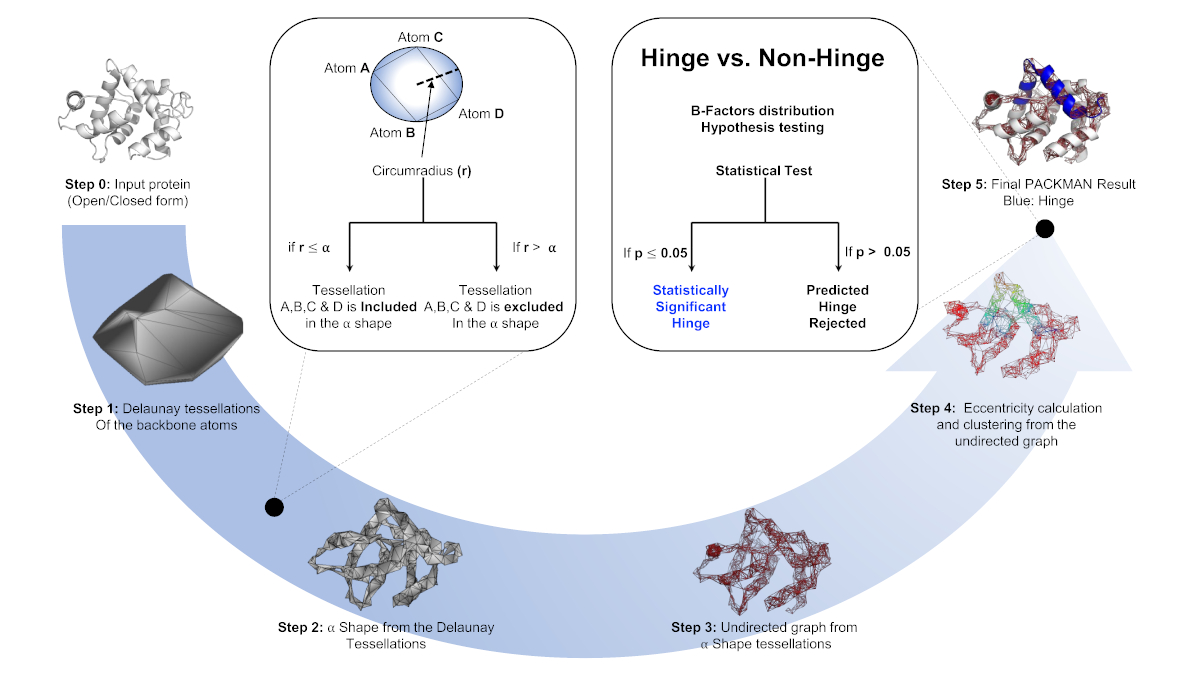
GUI INSTRUCTIONS
The PACKMAN GUI is one place for all the components in the PACKMAN including hdANM. It also helps user to generate .hng files without any hassle (Please follow the instructions in the GUI).
Run the following command in the terminal where python along with py-packman is installed. (See tutorial section for the installation section):
python -m packman gui
After this, GUI is made extremely simple and easy to follow (Follow section specific instructions on the GUI). Click away!
Video Tutorial (coming soon)
CLI INSTRUCTIONS
Following is the PACKMAN hinge prediction interface description:
usage: packman hinge [-h] [-pdbid PDB_ID]
                        [--e_clusters NumberOfEccentricityClusters]
                        [--minhnglen MinimumHingeLength] [--chain CHAIN]
                        [--generateobj GENERATEOBJ]
                        AlphaValue FILENAME

positional arguments:
AlphaValue            Recommended: 2.8 for closed; 4.5 for open form, Please
                        refer to the paper for more details
FILENAME              Path and filename of the PDB file.

optional arguments:
-h, --help            show this help message and exit
-pdbid PDB_ID, --pdbid PDB_ID
                        If provided, the PBD with this ID will be downloaded
                        and saved to FILENAME.
--e_clusters NumberOfEccentricityClusters
                        Recommended: 4, Please refer to the paper for more
                        details
--minhnglen MinimumHingeLength
                        Recommended: 5, Please refer to the paper for more
                        details
--chain CHAIN         Enter The Chain ID
--generateobj GENERATEOBJ
                        Path and filename to save the .obj file at. Ignored
                        unless --chain is provided.
EXAMPLES
- python -m packman hinge –pdbid 1prw 2.8 1prw.pdb OR packman –pdbid 1prw 2.8 1prw.pdb for –pdbid, the parameter is the PDB ID the user submits to download a corresponding PDB file. First positional parameter 2.8 is the alpha value parameter which can be changed. and second is the name of the file you wish to save the downloaded PDB file.
- python -m packman hinge 2.8 1prw.pdb OR python packman 2.8 1prw.pdb First parameter 2.8 is the alpha value parameter which can be changed. second parameter is the parameter is location and name of the PDB file.
OPTIONAL
If you wish to visualize the plane of the hinge, please refer to the following article:
- Plane Wizard (PyMOL wiki) : https://pymolwiki.org/index.php/Plane_Wizard